For more than two decades, scheduling an automated shutdown on Windows has been a clunky experience. Millions of users still rely on the cumbersome shutdown -s -t 3600 terminal command or dated utilities from the Windows XP era, riddled with obsolete interfaces, suspicious installers, or invasive adware.
At Kometa Networks, we believe everyday tools should be fast, safe, visually pleasing, and respectful of system resources. That’s why I developed and released Nocturna, a modern, ultra-lightweight, and completely free desktop utility for Windows 10 and 11. You can visit the official site at nocturna.kometa.cl.
1. The Problem: Powering Down Without Disruptions or Bloatware
Whether you’re leaving a massive Steam game downloading overnight, waiting for a 3D Blender render to finish, or drifting off to sleep with music or podcasts on YouTube, conventional timers suffer from two major flaws:
- Abrupt Audio Cut-Off (“Alarm Clock Effect”): Falling asleep with audio that cuts off instantly at high volume causes micro-awakenings that ruin restorative sleep.
- False Shutdown Positives: If a background application hangs, prompts to save changes, or if the timer process is accidentally terminated, Windows aborts the shutdown sequence and leaves the machine running all night.
2. Technical Innovations in Nocturna
Following the same engineering principles we apply across our software catalog like Huaso Shield and Escudo Mental, we engineered Nocturna from scratch with unique capabilities:
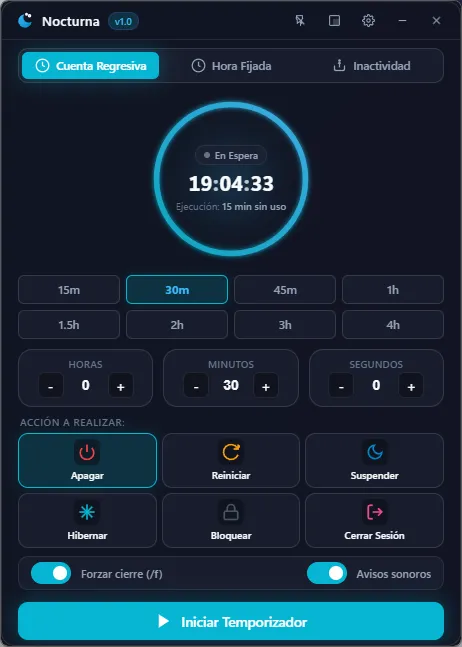
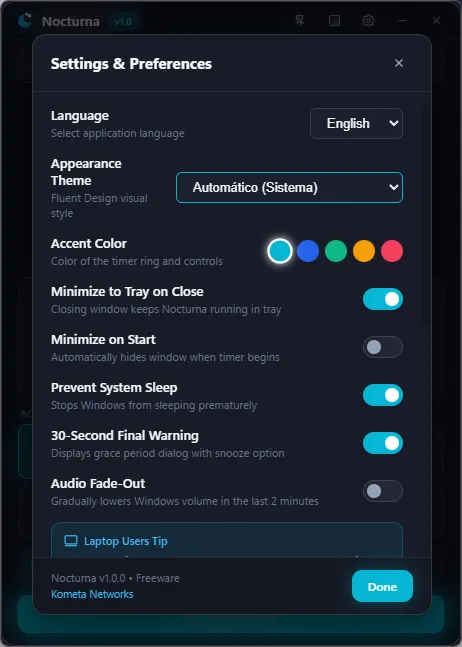
- Gradual Audio Fade-Out: During the final 2 minutes prior to shutdown or sleep, Nocturna gently lowers the OS master volume step-by-step, helping your mind transition smoothly into silence.
- Windows Fail-Safe Delegation: If you close the application window or kill the process while a timer is active, Nocturna hands the countdown directly over to Windows’ native
shutdown.exe, guaranteeing the PC turns off regardless. - Smart Idle Sensor (Idle Mode): Allows you to trigger shutdown or sleep only after the user has been away from the mouse and keyboard for a set period—ideal for background tasks without premature cuts.
- Instant Screen Off: A direct shortcut to turn off display backlights immediately, reducing power draw and nighttime room glare without stopping background workflows.
3. Technical Comparison: Traditional Methods vs. Nocturna
| Feature | CMD shutdown Command | Legacy Apps | Nocturna 1.0 |
|---|---|---|---|
| User Interface | Raw Console / No UI | Windows XP / 7 style | Native Windows 11 Fluent |
| Audio Fade-Out | Not available | Not available | Smooth 2-minute taper |
| Fail-Safe Protection | Limited | Aborts if app dies | Automated OS delegation |
| Memory Footprint | 0 MB | 40 – 90 MB | ~3 MB (System Tray) |
| Telemetry & Ads | Clean | Frequent adware/trackers | 100% Zero telemetry |
4. Rust Architecture and Resource Efficiency
Many modern desktop utilities wrap Chromium via Electron, burning 150+ MB of RAM just to display a simple clock.
For Nocturna, we opted for a native Rust architecture focused on uncompromising efficiency:
- The full installer weighs only 1.08 MB.
- Minimized in the system tray, it uses just ~3 MB of RAM.
- The binary is 100% audited on VirusTotal with zero detections across 70+ security engines.
5. Where to Download Nocturna
Nocturna is freeware created under the public tools division of Kometa Networks. You can grab either the installer or the portable version directly from the official website:
- 🌐 Official Website: nocturna.kometa.cl
- ⬇️ Download Installer (.exe): Nocturna-Setup-v1.0.0.exe (~1.1 MB)
- 📦 Portable Version (.exe): Nocturna-Portable.exe (~3.2 MB)
- 🛡️ Project Showcase: Check out the engineering details in the Nocturna Project Portfolio Page.