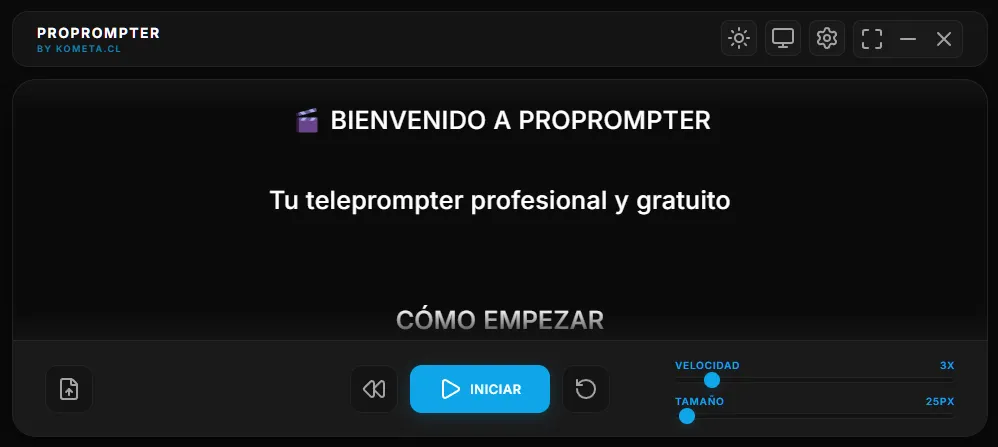
A few months ago, I found myself recording a technical tutorial. I had the perfect script, the camera ready, the lights set up… but I couldn’t remember all the content without sounding like a robot.
I tried several teleprompters:
- Option 1: $29/month. Too much for something I’d use occasionally.
- Option 2: Free but with ads every 5 minutes. Unacceptable.
- Option 3: Functional but with a 90s UI that made me want to cry.
The Decision
“How hard can it be to make a teleprompter?”
Spoiler: Not that hard, but not trivial either.
The Process
Week 1: MVP
I started with a simple MVP: a window that shows text and scrolls. 200 lines of code. It worked.
// Literally that simple at the start
function scroll() {
  textElement.style.top = position + "px";
  position -= speed;
  requestAnimationFrame(scroll);
}
Ugly, but functional. “Ship early, iterate often” principle.
Week 2-3: The Notch Mode
The idea came from watching professional YouTubers. They all have those expensive teleprompters mounted around the camera. What if you just put a small window near the webcam?
Boom. Notch mode.
The technical challenge was interesting:
- Always-on-top window (but not intrusive)
- Vertical scroll in a reduced space
- Minimal but accessible controls
- Draggable from the button bar
Week 4: Capture Protection
A client asked me to record a pitch with confidential information. “Can you make it so the screen can’t be captured?”
Electron has APIs for this. But there’s a catch: it only works on Windows.
// One line. Literally.
mainWindow.setContentProtection(true);
Sometimes solutions are simpler than you expect.
Week 5-6: Smart Scroll
I tried to implement voice control. Spent 3 days on it, but it didn’t work as intended.
Lesson learned: Sometimes the simple solution (manual control) is the best. Not everything needs AI.
Week 7-8: Polish
This phase took as long as everything before it. Details that matter: keyboard shortcuts, themes, smooth animations, and a solid website. 80% of the time goes into the last 20% of the product.
Technical Decisions
Why Electron?
I chose Electron because I already knew the stack (JS/HTML/CSS), it has a mature ecosystem, and it allowed for extremely fast development.
Why Vanilla JS?
I didn’t use frameworks. I wanted pure performance for 60fps scrolling, minimalism in bundle size, and honestly, I wanted to refresh my vanilla JS foundations.
Lessons Learned
- Ship Early, Iterate Often: v1.0 was basic. Real feedback dictated the features.
- The 80/20 is Real: Notch Mode + Smooth Scroll is 80% of the value.
- Free ≠ No Value: I made it free because it’s good for my portfolio and helps others, but it’s a professional product that solves a real problem.
Try it out
If you create video content, give it a chance:
👉 propromter.kometa.cl
It’s free, no ads, no subscriptions. Just download and use.
About me: Full-stack developer, founder of Kometa.cl, coffee addict, and occasionally I do useful things.